SplineTech Window Resizer
From Spline Technologies Corp
- Click a shortcut and resize the window!
- Cool! But I don't want to have a program sitting on my task bar all the
time!
-Me neither! So my program doesn't!
- But how does it work then?
-Every program in Windows can be called by clicking a chosen shortcut on
keyboard!
-Ah, I see where it is going!
-Yes, when you click a shortcut like CTRL+ALT+SHIFT+Z, windows starts
my program!
-AHA!
-Yes! And then my program finds the foreground window and resizes it using
the parameters specified in a shortcut!
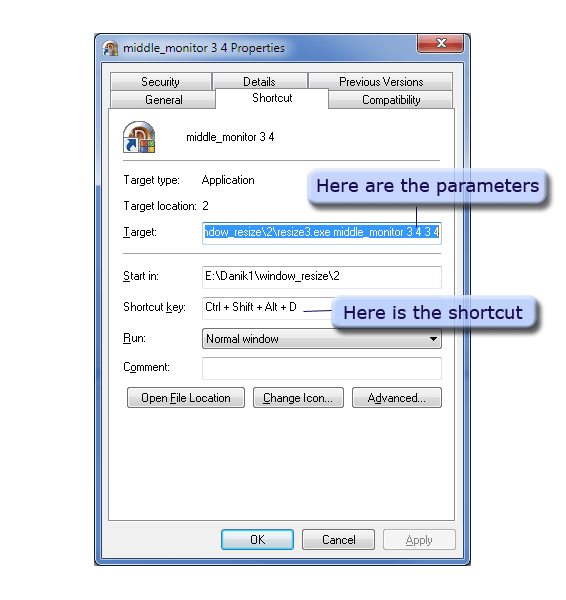
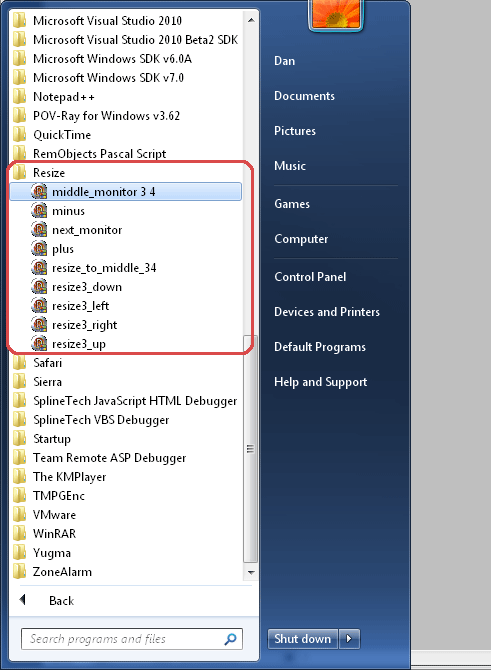
- So just by being in the start menu,
Windows knows to start this program if the shortcut key is clicked!
-Great! So what are the things it can do and what parameters should I use?
-It works like this: resize3.exe command parameters
| resize middle_monitor 3 4 3 4 | Ctrl+Alt+Shift+D | resize the current window into the middle of the monitor it is in with width=3/4 of monitor width and height=3/4 of monitor height So you can specify it as 3/4, or 1/2 or even 1/1 by saying resize middle_monitor 1 2 1 1 -this will result in 1/2 the width and 1/1 = 1 of full height of the monitor |
| ... middle 1 2 1 2 | ...+Q | Same thing but resizes into the middle of the primary monitor and width and height are just 1/2 of the monitors resolution |
| ... middle_monitor 1 1 1 1 | +A | resizes the window full screen but without maximizing it. Why? Because when you run Windows media for example and it's maximized, now when you click outside of it it restores! So this just resizes it full screen without maximizing. |
| ... minus 10 | ...+[-] | Reduce the size by 10% |
| ... plus 10 | ...+[+] | increase the size by 10% |
| ... down 100 | ...+[down] | Move window down by 100 pixels |
| ... up 100 | +[up] | Same things |
| ... left 100 | +[left] | |
| ... right 100 | +[right] | |
| ... next_monitor | Ctrl+Alt+Shift+Z | Move the window to the next monitor. Scales the window if the monitor is in different resolution. Very useful to get rid of windows you don't need quickly. |
| ... transparent 150 | Ctrl+Alt+Shift+R | Makes it semi-transparent to a degree |
| ... transparent 255 | Ctrl+Alt+Shift+F | Makes it opaque |
| ... to_right_bottom | +\ | Bottom right corner of the window is moved to the bottom right corner of the screen. |
-I see, why
Ctrl+Alt+Shift?
-So it won't be confused with a shortcut in the application. You can
change them.
-Cool! Do you provide
ready shortcuts?
-Yes, you can put them onto a desktop or into a start menu.
The program is just 1 exe and requires no installation or uninstallation and
no dlls
-So why did you develop it?
-I did it for myself. Many windows resize themselves on startup to
full screen without maximizing, so restoring them was useless, and you had
to resize them manually, which is a lot of meticulous work.
-Yeah...
-I wanted something that I could click and resize
-Other times windows would appear too small or too big, also resizing each
one is too much trouble.
-Sometimes a window will move itself outside of the monitor so the title bar
is not visible at all, and getting them back was also tricky.
-That one is tricky
-I have a big screen and I wanted something that will resize into a perfect
proportion like 1/2 the screen size or 3/4, I can't do it manually.
-Lately I wanted to move the windows to the next monitor quickly
-Yeah, me too I want to move the window on the next
screen
-I really didn't want a program to sit in a taskbar and monitor what I
press. I don't know it annoys me.
-Yeah, me too, yours doesn't :-)
-Exactly, mine gets started, does it job and unloads itself.
-Great! How much does it cost?
-$5, just $5 dollars. Does it worth $5 dollars?
-I think so.
SplineTech Window Resizer - $5